Understanding libEnsemble
Manager, Workers, Generators, and Simulators
libEnsemble’s manager allocates work to workers, which perform computations via generators and simulators:
generator: Generates inputs to the simulator
simulator: Performs an evaluation based on parameters from the generator
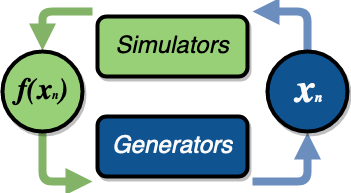
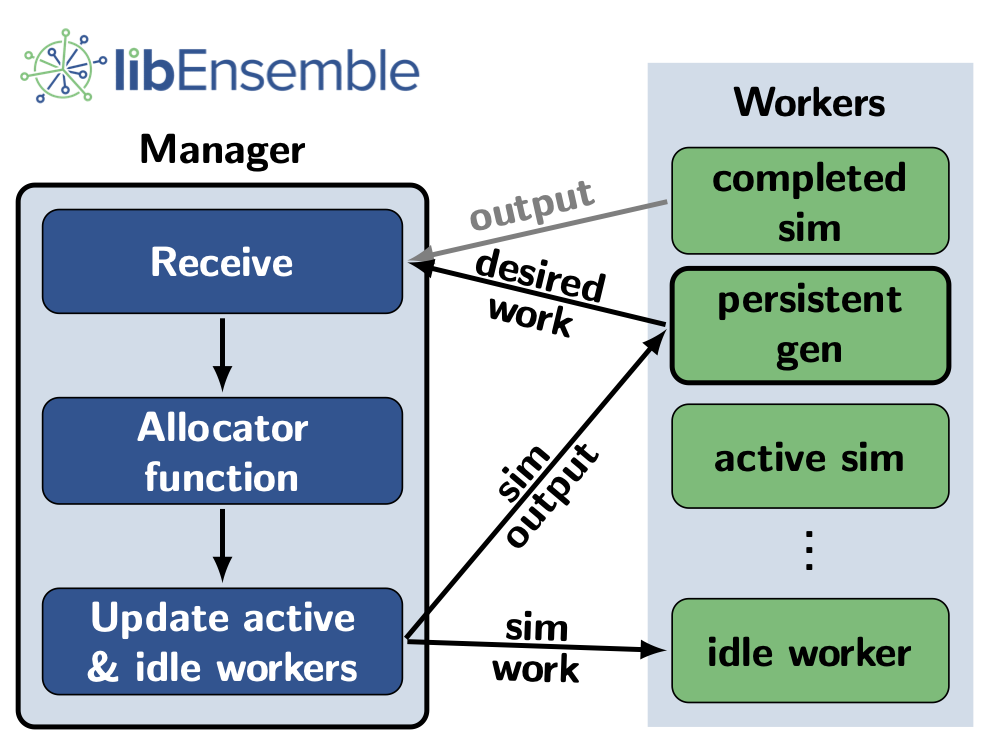
An executor interface is available so generators and simulators can launch and monitor external applications.
libEnsemble uses a NumPy structured array known as the history array to keep a record of all simulations and generated values.
Allocator Function
allocator: Decides whether a simulator or generator should be prompted (and with what inputs/resources) as workers become available
The default allocator (alloc_f) prompts workers to run the highest priority simulator work.
If a worker is idle and there is no simulator work, that worker is prompted to query the generator.
The default allocator is appropriate for the vast majority of use-cases, but is customizable for users interested in more advanced allocation strategies.
Example Use Cases
Below are some expected libEnsemble use cases that we support (or are working to support):
Click Here for Use-Cases
A user wants to optimize a simulation calculation. The simulation may already be using parallel resources but not a large fraction of some computer. libEnsemble can coordinate the concurrent evaluation of the simulation
sim_fat various parameter values based on candidate parameter values fromgen_f(possibly after eachsim_foutput).A user has a
gen_fthat produces meshes for asim_f. Given thesim_foutput, thegen_fcan refine a mesh or produce a new mesh. libEnsemble can ensure that the calculated meshes can be used by multiple simulations without requiring moving data.A user wants to evaluate a simulation
sim_fwith different sets of parameters, each drawn from a set of possible values. Some parameter values are known to cause the simulation to fail. libEnsemble can stop unresponsive evaluations and recover computational resources for future evaluations. Thegen_fcan possibly update the sampling after discovering regions where evaluations ofsim_ffail.A user has a simulation
sim_fthat requires calculating multiple expensive quantities, some of which depend on other quantities. Thesim_fcan observe intermediate quantities to stop related calculations and preempt future calculations associated with poor parameter values.A user has a
sim_fwith multiple fidelities, with the higher-fidelity evaluations requiring more computational resources, and agen_f/alloc_fthat decides which parameters should be evaluated and at what fidelity level. libEnsemble can coordinate these evaluations without requiring the user to know parallel programming.A user wishes to identify multiple local optima for a
sim_f. Furthermore, sensitivity analysis is desired at each identified optimum. libEnsemble can use the points from the APOSMMgen_fto identify optima; and after a point is ruled to be an optimum, a differentgen_fcan produce a collection of parameters necessary for sensitivity analysis ofsim_f.
Combinations of these use cases are supported as well. An example of such a combination is using libEnsemble to solve an optimization problem that relies on simulations that fail frequently.
Glossary
Here we define some terms used throughout libEnsemble’s code and documentation. Although many of these terms seem straightforward, defining such terms assists with keeping confusion to a minimum when communicating about libEnsemble and its capabilities.
Click Here for Glossary
Manager: Single libEnsemble process facilitating communication between other processes. Within libEnsemble, the Manager process configures and passes work to and from the workers.
Worker: libEnsemble processes responsible for performing units of work, which may include submitting or executing tasks. Worker processes run generation and simulation routines, submit additional tasks for execution, and return results to the manager.
Calling Script: libEnsemble is typically imported, parameterized, and initiated in a single Python file referred to as a calling script.
sim_fandgen_ffunctions are also commonly configured and parameterized here.User function: A generator, simulator, or allocation function. These are Python functions that govern the libEnsemble workflow. They must conform to the libEnsemble API for each respective user function, but otherwise can be created or modified by the user. libEnsemble comes with many examples of each type of user function.
Executor: The executor can be used within user functions to provide a simple, portable interface for running and managing user tasks (applications). There are multiple executors including the base
ExecutorandMPIExecutor.Submit: Enqueue or indicate that one or more jobs or tasks need to be launched. When using the libEnsemble Executor, a submitted task is executed immediately or queued for execution.
Tasks: Sub-processes or independent units of work. Workers perform tasks as directed by the manager; tasks may include submitting external programs for execution using the Executor.
Persistent: Typically, a worker communicates with the manager before and after initiating a user
gen_forsim_fcalculation. However, user functions may also be constructed to communicate directly with the manager, for example, to efficiently maintain and update data structures instead of communicating them between manager and worker. These calculations and the workers assigned to them are referred to as persistent.Resource Manager libEnsemble has a built-in resource manager that can detect (or be provided with) a set of resources (e.g., a node-list). Resources are divided up among workers (using resource sets) and can be dynamically reassigned.
Resource Set: The smallest unit of resources that can be assigned (and dynamically reassigned) to workers. By default it is the provisioned resources divided by the number of workers (excluding any workers given in the
zero_resource_workerslibE_specs option). However, it can also be set directly by thenum_resource_setslibE_specs option.Slot: The
resource setsenumerated on a node (starting with zero). If a resource set has more than one node, then each node is considered to have slot zero.